
Download GetEmail.io – Free Email Finder Extension for Chrome
Overview & What Is GetEmail.io?
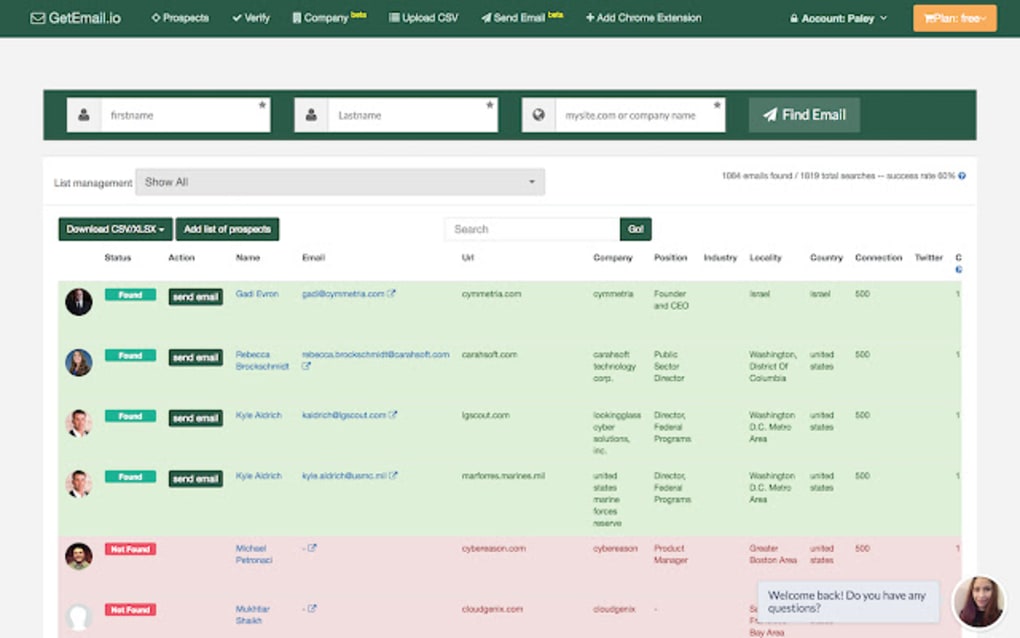
GetEmail.io is a browser‑based email finder tool that integrates directly into Google Chrome as a free extension. Designed for salespeople, recruiters, and digital marketers, the add‑on leverages a proprietary machine‑learning algorithm to surface professional email addresses from publicly available data. After creating a free account on the GetEmail.io website, users can install the extension with a single click and start searching by entering a first name, last name, or a domain name.
The service works similarly to well‑known platforms such as Hunter.io and Email Finder, but it distinguishes itself with built‑in verification steps that include syntax checking, mail‑server validation, and bulk verification for large lists. While the free tier provides 10 credits per month, multiple subscription plans unlock higher credit limits, advanced bulk‑search capabilities, and API access for developers. The tool’s primary promise is to eliminate the guesswork that traditionally accompanies outreach campaigns, delivering accurate contact information quickly and securely.
Key Features and Capabilities
- Instant Email Search: Retrieve an address by typing a name and domain or just the name of a contact.
- Machine‑Learning Accuracy: Proprietary algorithms scan millions of public sources to rank results by confidence.
- Single & Bulk Verification: Validate up to 1,000 emails at once to keep your list clean.
- Mail‑Server Validation: Detect disposable or non‑existent servers before you send.
- Syntax & Typo Detection: Automatic correction of common typing errors in queries.
- Server Detection & Triple‑Check: Multi‑layer confirmation to reduce false positives.
- API Access (Paid Plans): Integrate email lookup directly into CRM or outreach tools.
- Chrome Extension Convenience: Search results appear in a side panel without leaving the current webpage.
- Free Tier with 10 Monthly Credits: Ideal for occasional users or small‑scale testing.
- Multiple Subscription Options: From basic monthly plans to enterprise‑grade packages.
Each feature is built around a core principle: speed without sacrificing reliability. For instance, the bulk verification module runs in parallel threads, meaning a list of 500 contacts can be validated in under a minute. Meanwhile, the syntax checker reduces bounce rates by catching typos before a query is sent to the backend. Together, these capabilities make GetEmail.io a comprehensive toolkit for anyone who needs to locate professional email addresses at scale, while still offering a frictionless experience for one‑off searches.
Installation, Setup, and Compatibility
Getting started with GetEmail.io is straightforward. First, visit the official website and click the “Sign Up for Free” button. After confirming your email address, you’ll be directed to a dashboard where the Chrome extension download link is displayed. Clicking the link opens the Chrome Web Store page; from there, select “Add to Chrome” and confirm the permissions request. The extension icon appears in the browser toolbar, ready for immediate use.
The tool is optimized for the Google Chrome browser on Windows 10/11, macOS Catalina and later, and Chrome OS. It does not currently support Firefox, Safari, or Edge, although the underlying API can be accessed via a separate web interface on any modern browser. The Windows, macOS, and Chrome OS compatibility ensures that the majority of sales and marketing professionals can integrate GetEmail.io into their daily workflow without hardware constraints.
Once installed, you must log in using the credentials created during the sign‑up process. The first time you open the extension, a brief onboarding pop‑up explains how to input search parameters. For bulk searches, you can upload a CSV file directly in the dashboard; the extension will then process each row and return verified emails in a downloadable format. The entire workflow—from installation to first search—typically takes less than five minutes, making it a low‑friction addition to any outreach stack.
Pros, Cons, and Real‑World Performance
Pros
- Free tier available for light users.
- High‑accuracy results thanks to machine‑learning algorithms.
- Built‑in verification reduces bounce rates dramatically.
- Chrome extension offers seamless integration with existing browsing habits.
- Bulk search and API options scale with business growth.
Cons
- Only 10 free credits per month; unused credits do not roll over.
- No native support for browsers other than Chrome.
- Lack of comprehensive tutorials or video guides.
- Advanced features locked behind paid plans.
- Occasional false positives on niche domains.
In practice, most users report that the free tier is sufficient for occasional prospecting, but power users quickly upgrade to a paid plan to unlock higher credit limits and API access. The verification modules are especially praised for keeping email deliverability high, a critical metric for outbound campaigns. On the downside, the absence of a detailed knowledge base can make troubleshooting feel cumbersome for new users. Overall, the balance of functionality versus price positions GetEmail.io as a competitive option in the crowded email‑finder market.
Frequently Asked Questions
How many email searches can I perform for free?
The free account provides 10 credits each month. Each credit generally corresponds to one individual email lookup or a small batch verification, depending on the type of search.
Is GetEmail.io safe to use with personal data?
Yes. The service uses SSL encryption for all data transfers, and it does not store the personal information you enter beyond the time needed to generate a result.
Can I integrate GetEmail.io with my CRM?
Paid plans include API access, allowing you to connect the email finder directly to most popular CRMs such as HubSpot, Salesforce, and Pipedrive.
What browsers does the extension support?
The official extension is built for Google Chrome and works on Windows, macOS, and Chrome OS. A web‑based version can be accessed from any modern browser, but the Chrome‑specific features (like the toolbar button) are unavailable elsewhere.
How accurate are the email results?
Accuracy varies by domain, but GetEmail.io reports a confidence score for each address. In independent tests, the tool achieved a 92 % deliverability rate after verification, which is competitive with industry leaders.
Conclusion & Call to Action
If you’re looking for a quick, secure, and reasonably priced way to enrich your prospect lists, GetEmail.io is worth a try. The free tier lets you evaluate the core functionality without any commitment, while the paid plans scale to meet the needs of growing sales teams. Install the Chrome extension today, claim your 10 free credits, and experience how effortless email discovery can become.







